An Android phone connects to the console by MIDI and to your WiFi network. Tablets, laptops and phones open the console in their browser. Nothing else to install, and no Internet needed.
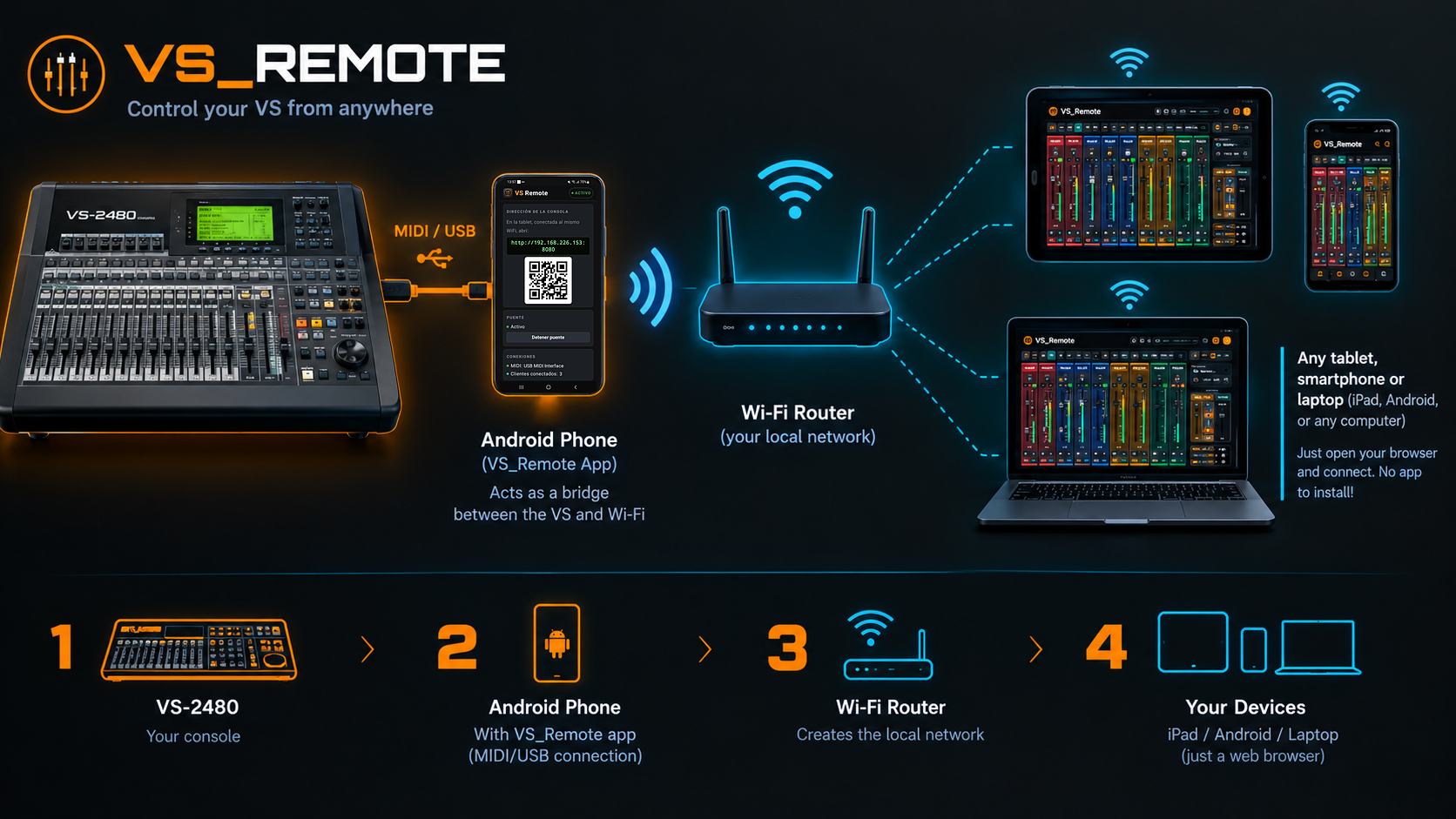
Tap the image to see it full size.
There are only two connections: the bridge phone to the console, by cable, and the bridge phone to the WiFi. Tablets and phones are never plugged into the console: they only join the WiFi.
Swipe the diagram to see all of it →
The simplest way: the USB-MIDI cable goes into the phone with a small OTG adapter. The phone runs on its battery.
The hub replaces the OTG adapter and lets you plug in the phone charger: the phone charges while it controls the console. Ideal for rehearsals, recordings and long shows.
It keeps working exactly as always: the sound comes in and goes out through its own connectors. VS_Remote only talks to it through its MIDI IN and MIDI OUT ports.
An Android phone with the VS_Remote app, connected to the console with a standard USB-MIDI adapter. It translates between MIDI and the network, and serves the console to every screen.
A normal home or studio router creates the local network. The phone and all the screens connect to it. It does not need Internet.
Tablets and laptops open the full console in the browser (iPad, Android, Windows, Mac, Linux). Each musician opens MOREME on their phone to control their own monitor mix.
Don't use your personal phone as the bridge: leave one phone just for the VS. An old Android you no longer use is perfect, or a cheap used one. It only needs Android 8 or later and a USB-C port that works as host (OTG). No SIM card or accounts are needed, just WiFi.
The first time takes a few minutes. After that, it is just plug in and start.
Plug the USB-MIDI adapter into the phone and its MIDI plugs into the console. The cables cross: the adapter's OUT goes to the console's MIDI IN, and the adapter's IN to the console's MIDI OUT.
Open VS_Remote on the phone and tap Start. It shows the address and a QR code, and keeps running with the screen off.
Scan the QR with any tablet or laptop on the same WiFi, or type the address in the browser. You can add it to the home screen like an app.
The app detects the console model, reads the whole mixer and is ready. Musicians join from their phones with their own link.
The VS has to be set to send and receive MIDI (in each model's MIDI and sync menus). The app shows the exact table of settings for your model, and changes some of them for you. They stay saved in the console.
Where those settings are on each model:
Only the orders travel (move a fader, play, mute, change an effect) and the data to draw the meters. Sound never goes through the phone or the WiFi.
When it connects, the app reads the whole mixer from the console. From then on, what you move on the console shows on the tablets, and what you move on a tablet changes the console (on the VS-2480 even the motorised faders move).
Several tablets can control the console at the same time and every change shows on all of them. An access PIN keeps strangers out, and each musician's phone only controls their own mix.
Scenes, projects, names, markers and personal mixes are stored on the bridge phone, with backups you can download. Nothing goes to the cloud.
The bridge keeps running with the screen off, reconnects by itself if a tablet sleeps or the WiFi drops, and reopens the MIDI interface if it is unplugged.
The app identifies the connected model and shows its channels, tracks, sends and effects. What a model cannot do over MIDI is simply not shown.